Showing posts with label t-mobile. Show all posts

Sunday, 31 January 2016

T-Mobile Device Unlock App (Android Official Unlock)

Mobile Device Unlock App for T-Mobile - Use Any SIM Card
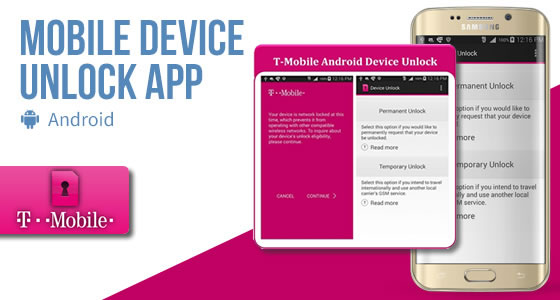
T-Mobile Device Unlock is an Android app that allows you to request and apply a T-Mobile mobile device unlock directly from the device. The features of this app include the ability to remotely request Mobile Device Unlock without having to contact Customer Care and automatically apply the Mobile Device Unlock to the device without the use of a manual code.

Thanks to this app, we’re now able to Register any IMEI as “Eligible” in the T-Mobile Database so you can unlock your Cell Phone using the “Device Unlock” App. Turnaround time for this service is less than 2 Business Days.

All you need is an Android device that supports the Mobile Device Unlock app:

  • Alcatel OneTouch POP Astro (OT-5042T),
  • Alcatel OneTouch Evolve (OT-5024N),
  • Coolpad Rogue (3320A),
  • HTC 10,
  • HTC One M9,
  • HTC Desire 626s,
  • Kyocera Hydro LIFE (C6530),
  • Kyocera Hydro Wave (C6740),
  • LG G Stylo (H631),
  • LG G4 (H811),
  • LG G5 (H830),
  • LG K7 (K330),
  • LG K10,
  • LG Leon LTE (H345),
  • LG V10 (H901),
  • Samsung Galaxy Avant (SM-G386T),
  • Samsung Galaxy J7 (SM-J700T)
  • Samsung Galaxy S6 (SM-G920T),
  • Samsung Galaxy S6 Edge (SM-G925T),
  • Samsung Galaxy S6 Edge+ (SM-G928T),
  • Samsung Galaxy S7 (SM-G930T),
  • Samsung Galaxy S7 Edge (SM-G935T),
  • Samsung Galaxy Note 5 (SM-N920T),
  • Samsung Galaxy Grand Prime (SM-G530T),
  • Samsung Galaxy Core Prime (SM-G360T),
  • Sony Xperia Z3 (D6616),
  • ZTE Avid Plus (Z828),
  • ZTE Obsidian (Z820),
  • ZTE Zinger (Z667T).
This T-Mobile unlocking method, applies only to phones that comes with the Pre-Installed Device Unlock App. If your phone does not have this application installed but asks for the "SIM Network Unlock PIN", we can still help you to unlock it by unlock code.

If your phone do have the T-Mobile Device Unlock app,  please make sure BEFORE placing an order that your phone shows "Not Eligible for Unlock" error when you tab to open the app.

Once the unlock request is processed, you'll need to:
  1. Make sure you have an active data connection via 3G/4G/LTE or Wi-Fi.
  2. From the Application list, tap "Device Unlock" (Note: The application may be located in the T-Mobile folder.)
  3. Tap Continue.
  4. Choose the Permanent Unlock type:
  5. If successful, restart the device to apply the settings.

If instead you have the error "Server not responding" this means that your phone is not able to communicate with T-Mobile Server (Communication Error) and therefore it cannot be unlocked.

Tips to get rid of "Server not Responding" error:
1 - Make sure you use the original Stock ROM from T-Mobile since it will not work if you flash your phone with any custom Firmware from T-Mobile, CyanogenMod, or even an Unbranded ROM.
2 - Make sure you're using the last version of T-Mobile Firmware for your Cell Phone.
3 - Finally (after upgrade) perform a Hard Reset on your Cell Phone (you'll find Hard Reset method on:http://www.hardreset.info or check on YouTube).
4 - Turn off 3G/LTE and force the use of a local WiFi Hotspot.
5 - Make sure you use home Wifi (and not a public/company WiFi since they might use firewall, vpn, etc... that will trouble communication)

If none of these recommendations work for you, then we cannot unlock your device. If you find a way to fix this problem with another method, please let us now so we can help better our community.


In case of problem unlocking your phone after delivery:

- Ask us by email for FIX (we will perform one free FIX without asking for Video Proof)
- If after fix, the phone is still locked, then please contact us by email to get the UNIQUE reference code we will ask you to show in the video (to make sure the video was recorded AFTER we fix)

We only refund for "NOT ELIGIBLE FOR UNLOCK" issue, we will not refund any complaint about "Communication Error" or "Server not responding. please try again later". It is mandatory to check before ordering if your phone have "Server not responding. please try again later." issue. If the answer is yes then you can try to fix this error by performing a hard reset on your phone, or upgrading his firmware. Again make sure your phone can communicate with "Device Unlock App" server BEFORE place your order.

For more information go to: Mobile Device Unlock App

Still have some questions? Please leave your comment below and we will come back to you within 24 hrs.


Read More »

Sunday, 11 October 2015

How to Unlock Samsung Galaxy Xcover 3 from T-Mobile by Unlock Code

Factory Unlock Code for Samsung Galaxy Xcover 3 from T-Mobile


The video below is an example of a customer unlocking a Samsung Galaxy phone. We unlock 99% of all GSM networks for any Galaxy device. Unlocking your phone could not be simpler and is 100% Guaranteed. Watch the Video sample below:


Unlocking Instructions for Samsung Galaxy Xcover 3:
1.  Enter a SIM Card from a network that does not work with your phone, 
2.  Power your Samsung phone on. 
3.  Once powered on, you will be asked for an unlock code. 
4.  Enter the unlock code provided by us on the email into your Samsung device.  
5.  Your phone is now unlocked!!!! 

IMPORTANT: Prior placing the order please make sure your phone is locked
by power it on with a non-accepted SIM card.  - The phone MUST prompt for the unlock code.


Most common questions when unlocking Samsung

1. What's the average delivery Time? The average delivery time for any Samsung unlock code is 45 min

2. Do the unlock codes work? Yes they do! Our Samsung codes are provided by the manufacture and they are uniquely assigned to your phone's IMEI.

3. What happen if my Samsung Phone is hard locked?

Don't Worry! You will get a set codes: NETWORK code, PROVIDER code, SUBPROVIDER code and DEFREEZE code.If your phone is hard locked, all you have to do is to enter first the DEFREEZE code and press "Unlock" and then the NETWORK code and press "Unlock, the screen should display "Network Unlock Successful"

** A phone is hard locked when the wrong code has been entered several times.  


Read More »

Thursday, 1 October 2015

How to Unlock LG Leon on T-Mobile by unlock code

Factory Unlock Code for LG Leon from T-Mobile


With LG Leon™ (LTE), experience the joy of beauty and performance together. With unique LG experiences – Dynamic 4.5” Curved Design with intuitive rear key buttons , Gesture shot, KnockOn, QuickMemo+, and more take interactivity to a whole new level.

IMPORTANT: Prior placing the order, please make sure your phone is locked by power it on with a non-accepted SIM card - The phone MUST prompt for the unlock code. Please also make sure that your phone is not hard locked and you have enough attempts to enter the code. Don't worry about this is it's a new phone. However, if you are not sure of the phone's history, please contact us first as there is absolutely no refunds if there have been too many previous attempts to unlock your phone with an incorrect code.

LG
Leon Unlocking Instructions:
1.  Power on your LG Leon phone with a non- accepted SIM Card,
2.  Once powered on, you will be asked for a Network Unlock Code,
3.  Enter the unlock code (we will email you the unlock code).
4.  Your phone is now unlocked!!!! 


Reasons to remotely unlock LG Leon with UnlockCode4U:
* Unlock your phone from the comfort of your own home.
* Never send your phone to anybody.
* If you travel you will save roaming fees by being able to use a local SIM cards.
* Warranty will not be voided.
* The resell value of your device will increase significantly as it is available to more networks.
* Easily switch between SIM card, using the same mobile phone.
* Very easy, no technical experience necessary.
* The phone is permanently unlocked, even after updates.
* 100% Guaranteed, if we cannot get you, your unlock solution we will refund you. 


***And Remember if you are interested on unlocking your phone for free through our video promotion, please leave your comment below.


Read More »

Wednesday, 23 September 2015

Unlock Microsoft Lumia 640 from T-Mobile by unlock code

Factory Unlock Code for Microsoft Lumia 640 from T-Mobile

Microsoft Lumia 640 is offering everything you need to work on the go, this affordable Windows® Phone features some of the best Microsoft products and services—including Office, OneNote, Cortana, and OneDrive—built-in and free.

IMPORTANT: Prior placing your unlock code order please make sure your phone is locked by power it on with a non-accepted SIM card. Lumia phones will display “Enter Pin” or “Enter Unlock Code


Lumia 640 Unlocking Instructions:
1.  Power on your Lumia phone with a non- accepted SIM Card,
2.  Once powered on, you will be asked for a
“Enter Pin” or “Enter Unlock Code”,
3.  Enter the unlock code provided by us on the email we sent into your Lumia device.
4.  Your phone is now unlocked!!!! 


The video below is an example of a customer unlocking his Lumia Phone. Unlocking your Lumia could not be simpler and is 100% Guaranteed.


Common Q&A
1. After unlocking, can I use my phone on any GSM network?
Yes, as soon as your phone is unlocked you will be able to use it on any GSM network, national and international.

2. Do the unlock codes work?
Yes they do! Our Lumia codes are provided by the manufacture and they are uniquely assigned to your phone IMEI.


3. How much will it cost?
The price will depend on the network the phone is locked to and the model. So go to unlock code for Lumia 640 choose your model and then the network, and it will tell.

Reasons to remotely unlock Lumia 640 with UnlockCode4U:
* Unlock your phone from the comfort of your own home.
* Never send your phone to anybody.
* If you travel you will save roaming fees by being able to use a local SIM cards.
* Warranty will not be voided.
* The resell value of your device will increase significantly as it is available to more networks.
* Easily switch between SIM card, using the same mobile phone.
* Very easy, no technical experience necessary.
* The phone is permanently unlocked, even after updates.
* 100% Guaranteed, if we cannot get you, your unlock solution we will refund you.


More Information: Unlock Lumia 640


Read More »
