Showing posts with label orange. Show all posts

Saturday, 15 August 2015

Unlock ZTE Grand X Plus by unlock code

Factory Unlock Code for ZTE Grand X Plus

This Code is eligible for our Cash Back Promo. Click on the image below for more details:
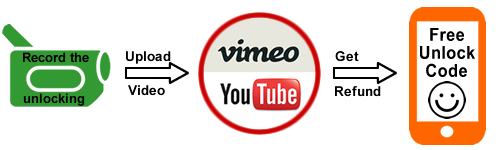
 Make a video unlocking your phone and get 100% cash back :)

IMPORTANT: Prior placing the order please make sure your phone is locked by power it on with a non-accepted SIM card. The phone MUST prompt for the unlock code.

ZTE Grand X Plus Unlocking Instructions: 
1.  Power on your ZTE phone with a non- accepted SIM Card,
2.  Once powered on, you will be asked for a
“SIM Network Unlock PIN”,
3.  Enter the unlock code provided by us on the email we sent into your ZTE device.
4.  Your phone is now unlocked!!!! 


Common Q&A
1. After unlocking, can I use my phone on any GSM network?
Yes, as soon as your phone is unlocked you will be able to use it on any GSM network, national and international.

2. Do the unlock codes work?
Yes they do! Our ZTE codes are provided by the manufacture and they are uniquely assigned to your phone's IMEI.


3. How long does it take?
The average delivery time is 2 hrs.

Reasons to remotely unlock ZTE  Grand X Plus with UnlockCode4U:
* Unlock your phone from the comfort of your own home.
* Never send your phone to anybody.
* If you travel you will save roaming fees by being able to use a local SIM cards.
* Warranty will not be voided.
* The resell value of your device will increase significantly as it is available to more networks.
* Easily switch between SIM card, using the same mobile phone.
* Very easy, no technical experience necessary.
* The phone is permanently unlocked, even after updates.
* 100% Guaranteed, if we cannot get you, your unlock solution we will refund you.


Read More »

Friday, 12 June 2015

How to unlock Huawei Ascend Y530 from Any Network WorldWide by unlock code

Factory Unlock Code for Huawei Ascend Y530 

This Code is eligible for our Cash Back Promo. Click on the image below for more details:

 Make a video unlocking your phone and get 100% cash back :)

IMPORTANT: Prior placing the order, please make sure your phone is locked by power it on with a non-accepted SIM card - The phone MUST prompt for the unlock code.

Huawei Ascend Y530
Unlocking Instructions: 
1.  Power on your Huawei phone with a non- accepted SIM Card,
2.  Once powered on, you will be asked for a Network Unlock Code,
3.  Enter the unlock code provided by us on the email we sent into your HUAWEI device.
4.  Your phone is now unlocked!!!! 


The video below is an example of a customer unlocking a Huawei Phone. We unlock 99% of all GSM networks for any Huawei device. Unlocking your phone could not be simpler and is 100% Guaranteed. Watch the Video sample below:


Reasons to remotely unlock Huawei Ascend Y530 with UnlockCode4U:
* Unlock your phone from the comfort of your own home.
* Never send your phone to anybody.
* If you travel you will save roaming fees by being able to use a local SIM cards.
* Warranty will not be voided.
* The resell value of your device will increase significantly as it is available to more networks.
* Easily switch between SIM card, using the same mobile phone.
* Very easy, no technical experience necessary.
* The phone is permanently unlocked, even after updates.
* 100% Guaranteed, if we cannot get you, your unlock solution we will refund you.


Read More »

Wednesday, 6 May 2015

How to unlock Samsung Galaxy A5 by unlock code from any Ireland or UK Network

Factory Unlock Code for Samsung Galaxy A5


The video below is an example of a customer unlocking a Samsung Galaxy phone. We unlock 99% of all GSM networks for any Galaxy device. Unlocking your phone could not be simpler and is 100% Guaranteed. Watch Video Sample Below:


Unlocking Instructions for Samsung Galaxy A5:

1.  Enter a SIM Card from a network that does not work with your phone, 

2.  Power your Samsung phone on. 
3.  Once powered on, you will be asked for an unlock code. 
4.  Enter the unlock code provided by us on the email into your Samsung device.  
5.  Your phone is now unlocked!!!! 

IMPORTANT: Prior placing the order please make sure your phone is locked
by power it on with a non-accepted SIM card.  - The phone MUST prompt for the unlock code.


Most common questions when unlocking Samsung

1. What's the average delivery Time? The average delivery time for any Samsung unlock code is 45 min

2. Do the unlock codes work? Yes they do! Our Samsung codes are provided by the manufacture and they are uniquely assigned to your phone's IMEI.

3. What happen if my Samsung Phone is hard locked?

Don't Worry! You will get a set codes: NETWORK code, PROVIDER code, SUBPROVIDER code and DEFREEZE code.If your phone is hard locked, all you have to do is to enter first the DEFREEZE code and press "Unlock" and then the NETWORK code and press "Unlock, the screen should display "Network Unlock Successful"

** A phone is hard locked when the wrong code has been entered several times.  


Read More »

Friday, 1 May 2015

How to unlock Huawei Ascend Y550 from Any GSM Network worldwide by unlock code

Factory Unlock Code for Huawei Ascend Y550

This Code is eligible for our Cash Back Promo. Click on the image below for more details:

 Make a video unlocking your phone and get 100% cash back :)

IMPORTANT: Prior placing the order, please make sure your phone is locked by power it on with a non-accepted SIM card - The phone MUST prompt for the unlock code.

Huawei Ascend Y550
Unlocking Instructions: 
1.  Power on your Huawei phone with a non- accepted SIM Card,
2.  Once powered on, you will be asked for a Network Unlock Code,
3.  Enter the unlock code provided by us on the email we sent into your HUAWEI device.
4.  Your phone is now unlocked!!!! 


The video below is an example of a customer unlocking a Huawei Phone. We unlock 99% of all GSM networks for any Huawei device. Unlocking your phone could not be simpler and is 100% Guaranteed. Watch the Video sample below:


Reasons to remotely unlock Huawei Ascend Y550 with UnlockCode4U:
* Unlock your phone from the comfort of your own home.
* Never send your phone to anybody.
* If you travel you will save roaming fees by being able to use a local SIM cards.
* Warranty will not be voided.
* The resell value of your device will increase significantly as it is available to more networks.
* Easily switch between SIM card, using the same mobile phone.
* Very easy, no technical experience necessary.
* The phone is permanently unlocked, even after updates.
* 100% Guaranteed, if we cannot get you, your unlock solution we will refund you.


Read More »

Wednesday, 29 April 2015

Instant Unlocking for HTC Desire 620 and use any SIM card

Factory Unlock Code for HTC Desire 620

This Code is eligible for our Cash Back Promo. Click on the image below for more details:
 
The HTC Desire 620 is one of the latest phones from HTC and it can be unlocked same day with no cable or difficult instructions.  


IMPORTANT: Prior placing the order please make sure your phone is locked by power it on with a non-accepted SIM card - The phone MUST prompt for the unlock code.

HTC Desire 620 Unlocking Instructions Guide:
1. Insert a non-accepted Sim card
2. Phone will ask for a “Sim Network Unlock Pin”
3. Enter the 8 digit Unlock Code emailed to you
 

4. Your Phone is unlocked!! 

The video below is an example of a customer unlocking HTC Phone. Unlocking your HTC could not be simpler and is 100% Guaranteed.


Why Unlock your HTC Desire 620 with UnlockCode4U.com?

* Unlock your phone from the comfort of your own home. 
* Never send your phone to anybody.
* If you travel you will save roaming fees by being able to use a local simcards.
* Warranty will not be voided.
* The resell value of your device will increase significantly as it is available to more networks.
* Easily switch between simcard, using the same mobile phone.
* Very easy, no technical experience necessary.
* No complicated software, or cable, just simply enter the unlock code we send you.
* The phone is permanently unlocked, even after updates.

100% Guaranteed to Unlock your HTC Desire 620 for any GSM Network


Read More »

Monday, 13 April 2015

How to unlock iPhone 3G, 3Gs, 4, 4s, 5, 5s, 5c, 6, 6 Plus from Orange France

iTunes Factory Unlock solution for any iPhone from Orange France

This Code is eligible for our Cash Back Promo. Click on the image below for more details:
 Make a video unlocking your phone and get 100% cash back :)


We offer the only “Permanently” unlock solution for any iPhone from Fido as the IMEI is registered as “Unlocked” in Apple's database. 
Your phone will always be unlocked even after each new update of iOS.

iPhone Unlocking Instructions:

1. Press *#06# to find your iPhone’s IMEI number
2. Place your order for your iPhone

3. Once finished processing you will receive and email from us saying “Activated” or “Unlocked”.
4. Now do the following below:

- Install last version of iTunes
- Make sure your itunes is the latest version
- Connect your iPhone to iTunes with non-accepted sim card
- Wait until itunes detects your iPhone
- Now disconnect your iPhone and then reconnect after 10 seconds.
- Phone is Unlocked! You will see this on itunes:


IMPORTANT NOTE:
* Prior unlocking, your iPhone has to be activated and used on the original Network you are trying to Unlock. It has to be “Activated” status.
* You will need to connect your iPhone to your Computer iTunes (Latest Version Required)


The video below is an example of a customer unlocking her iPhone 6. Unlocking your iPhone could not be simpler and is 100% Guaranteed


Reasons to remotely unlock iPhone with UnlockCode4U:
* World Class Customer Service

* Unlock your phone from the comfort of your own home.
* Never send your phone to anybody.
* If you travel you will save roaming fees by being able to use a local SIM cards. 

* Warranty will not be voided.
* The resell value of your device will increase significantly as it is available to more networks.
* Easily switch between SIM card, using the same mobile phone.
* Very easy, no technical experience necessary.
* The phone is permanently unlocked, even after updates.
* 100% Guaranteed, if we cannot get you, your unlock solution we will refund you.  


Read More »

Saturday, 4 April 2015

Instant Unlocking Code for LG G3 S locked to any UK / Ireland Network


This Code is eligible for our Cash Back Promo. Click on the image below for more details:

 Make a video unlocking your phone and get 100% cash back :)

IMPORTANT: Prior placing the order please make sure your phone is locked by power it on with a non-accepted SIM card.  - The phone MUST prompt for the unlock code.

LG G3 S Unlocking Instructions Guide are very simple:

1. Insert a non-accepted Sim card
2. Phone will ask for a “Sim Network Unlock Pin”
3. Enter the 16 digit Unlock Code emailed to you

4. Your Phone is now unlocked!!

Or

1. turn the phone on with a non-accepted SIM card and type 2945#*722# If nothing happens, type
2945#*724# - 2945#*725# or 2945#*728#
2. on LCD of your LG will pop up a hidden menu
3. enter unlock code received from sim-unlock.net
4. confirm this and your LG is already unlocked !!!


FAQ about Unlocking the LG G3 S
Q: How much will it cost to Unlock my LG G3 S?
A: The price will depend on the Network your LG is locked to. Click on the link below to find it out. 


Q: How will I get my
LG G3 S Unlock Code and how long will it take?
A: Once your payment is sent and cleared you will be emailed the Unlock code and detailed instruction. The average delivery time is 3-5 Minutes (Occasionally this may vary, however our automated system will automatically email you once the code is ready)


Q: Will this work for sure?
A: Yes, all of our codes are 100% Guaranteed and genuine to unlock your phone’s Network. Please keep in mind, an unlocked phone will not be compatible with every Service Provider. It is up to you to verify with the carrier you wish to use if your LG G3 S will be compatible on their network after being unlocked.

Q: Will Unlocking my LG G3 S damage my phone or erase any data?
A: Absolutely not, the method we use is the official and genuine way to unlock your LG G3 S via Remote unlock code. After Unlocking your device nothing will change, except your phone’s ability to use other network simcards with it. It is 100% guaranteed and safe for unlocking your phone’s network.
 

>>>>>>Unlock Code for LG G3 S<<<<


Read More »

Wednesday, 1 April 2015

How to unlock Huawei Ascend G7 from Any Network in Europe by unlock code

Factory Unlock Code for Huawei Ascend G7 

This Code is eligible for our Cash Back Promo. Click on the image below for more details:

 Make a video unlocking your phone and get 100% cash back :)

IMPORTANT: Prior placing the order, please make sure your phone is locked by power it on with a non-accepted SIM card - The phone MUST prompt for the unlock code.

Huawei Ascend G7
Unlocking Instructions: 
1.  Power on your Huawei phone with a non- accepted SIM Card,
2.  Once powered on, you will be asked for a Network Unlock Code,
3.  Enter the unlock code provided by us on the email we sent into your HUAWEI device.
4.  Your phone is now unlocked!!!! 


The video below is an example of a customer unlocking a Huawei Phone. We unlock 99% of all GSM networks for any Huawei device. Unlocking your phone could not be simpler and is 100% Guaranteed. Watch the Video sample below:


Reasons to remotely unlock Huawei Ascend G7 with UnlockCode4U:
* Unlock your phone from the comfort of your own home.
* Never send your phone to anybody.
* If you travel you will save roaming fees by being able to use a local SIM cards.
* Warranty will not be voided.
* The resell value of your device will increase significantly as it is available to more networks.
* Easily switch between SIM card, using the same mobile phone.
* Very easy, no technical experience necessary.
* The phone is permanently unlocked, even after updates.
* 100% Guaranteed, if we cannot get you, your unlock solution we will refund you.


Read More »