Showing posts with label telus. Show all posts

Saturday, 15 August 2015

Unlock ZTE Grand X Plus by unlock code

Factory Unlock Code for ZTE Grand X Plus

This Code is eligible for our Cash Back Promo. Click on the image below for more details:
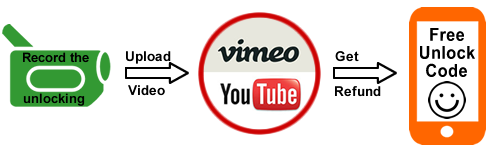
 Make a video unlocking your phone and get 100% cash back :)

IMPORTANT: Prior placing the order please make sure your phone is locked by power it on with a non-accepted SIM card. The phone MUST prompt for the unlock code.

ZTE Grand X Plus Unlocking Instructions: 
1.  Power on your ZTE phone with a non- accepted SIM Card,
2.  Once powered on, you will be asked for a
“SIM Network Unlock PIN”,
3.  Enter the unlock code provided by us on the email we sent into your ZTE device.
4.  Your phone is now unlocked!!!! 


Common Q&A
1. After unlocking, can I use my phone on any GSM network?
Yes, as soon as your phone is unlocked you will be able to use it on any GSM network, national and international.

2. Do the unlock codes work?
Yes they do! Our ZTE codes are provided by the manufacture and they are uniquely assigned to your phone's IMEI.


3. How long does it take?
The average delivery time is 2 hrs.

Reasons to remotely unlock ZTE  Grand X Plus with UnlockCode4U:
* Unlock your phone from the comfort of your own home.
* Never send your phone to anybody.
* If you travel you will save roaming fees by being able to use a local SIM cards.
* Warranty will not be voided.
* The resell value of your device will increase significantly as it is available to more networks.
* Easily switch between SIM card, using the same mobile phone.
* Very easy, no technical experience necessary.
* The phone is permanently unlocked, even after updates.
* 100% Guaranteed, if we cannot get you, your unlock solution we will refund you.


Read More »

Wednesday, 10 June 2015

Instant unlocking for HTC Desire 610 from any Carrier

Factory Unlock Code for HTC Desire 610

This Code is eligible for our Cash Back Promo. Click on the image below for more details:
 
The HTC Desire 610 is one of the latest phones from HTC and it can be unlocked same day with no cable or difficult instructions.  


IMPORTANT: Prior placing the order please make sure your phone is locked by power it on with a non-accepted SIM card - The phone MUST prompt for the unlock code.

HTC Desire 610 Unlocking Instructions Guide:
1. Insert a non-accepted Sim card
2. Phone will ask for a “Sim Network Unlock Pin”
3. Enter the 8 digit Unlock Code emailed to you
 

4. Your Phone is unlocked!! 

The video below is an example of a customer unlocking HTC Phone. Unlocking your HTC could not be simpler and is 100% Guaranteed.


Why Unlock your HTC Desire 610 with UnlockCode4U.com?

* Unlock your phone from the comfort of your own home. 
* Never send your phone to anybody.
* If you travel you will save roaming fees by being able to use a local simcards.
* Warranty will not be voided.
* The resell value of your device will increase significantly as it is available to more networks.
* Easily switch between simcard, using the same mobile phone.
* Very easy, no technical experience necessary.
* No complicated software, or cable, just simply enter the unlock code we send you.
* The phone is permanently unlocked, even after updates.

100% Guaranteed to Unlock your HTC Desire 610 for any GSM Network


Read More »

Monday, 4 May 2015

How to Unlock LG G3 by unlock code from any network World Wide

Factory Unlock Code for LG G3 from any Network World Wide


IMPORTANT: IMEI numbers starting by 99000 are not supported. Please do not place orders for this IMEI number as there is no way to enter the code. Also make sure prior placing the order that your phone is locked by power it on with a non-accepted SIM card. - The phone MUST prompt for the unlock code.

LG G3 Unlocking Instructions Guide:
1. Insert a non-accepted Sim card
2. Phone will ask for a “Sim Network Unlock Pin”
3. Enter the 16 digit Unlock Code emailed to you
. Your Phone is now unlocked!!

If the phone does not ask for the unlocking code follow the instructions below:
1. Switch your phone on with no SIM card or non-accepted SIM card (try both options).
2. Press the call button or go to the dial screen.
3. As if making a call dial 2945#*855# (if this does not work please try on of the combination below)
4. Select Network lock or Service Provider lock.
5. Enter the unlock code.
6. Click Done.
7. Click Unlock.


As there are several variants of LG G3 if you don't know which model you have you will have to try all the combinations below:
Unlock LG G3 D855 you must dial 2945#*855#
Unlock LG G3 D850 you must dial 2945#*850#
Unlock LG G3 D851 you must dial 2945#*851#
Unlock LG G3 D852 you must dial 2945#*852#


FAQ about Unlocking LG G3
Q: How much will it cost to Unlock LG G3 and use any SIM card?
A: The price will depend on the Network your
LG G3 is locked to. Click on the link below to find it out. 

Q. What's the average delivery Time? 

The average delivery time for LG G3 unlock codes is 25 minutes

Q: Will this work for sure?
A: Yes, all of our codes are 100% Guaranteed and genuine to unlock your phone’s Network. Please keep in mind, an unlocked phone will not be compatible with every Service Provider. It is up to you to verify with the carrier you wish to use if your
LG G3 will be compatible on their network after being unlocked.

Q: Will Unlocking my LG G3
damage my phone or erase any data?
A: Absolutely not, the method we use is the official and genuine way to unlock your 
LG G3 via Remote unlock code. After Unlocking your device nothing will change, except your phone’s ability to use other network SIM cards with it. It is 100% guaranteed and safe for unlocking your phone’s network.


Read More »

Tuesday, 7 April 2015

How to unlock Samsung Galaxy Mega 2 by unlock code from any US / Canada Carriers


The video below is an example of a customer unlocking his Samsung Galaxy phone. We unlock 99% of all GSM networks for any Galaxy Mega 2. Unlocking your phone could not be simpler and is 100% Guaranteed. 


IMPORTANT: Prior placing the order please make sure your phone is locked
by power it on with a non-accepted SIM card.  - The phone MUST prompt for the unlock code.


Unlocking Instructions for Samsung Galaxy Mega 2 Mini:

1.  Enter a SIM Card from a network that does not work with your phone, 

2.  Power your Samsung phone on. 
3.  Once powered on, you will be asked for an unlock code. 
4.  Enter the unlock code provided by us on the email into your Samsung device.  
5.  Your phone is now unlocked!!!! 

Most common questions when unlocking Samsung

1. What's the average delivery Time? The average delivery time for any Samsung unlock code is 2 hrs

2. Do the unlock codes work? Yes they do! Our Samsung codes are provided by the manufacture and they are uniquely assigned to your phone's IMEI.

3. What happen if my Samsung Phone is hard locked?

Don't Worry! You will get a set codes: NETWORK code, PROVIDER code, SUBPROVIDER code and DEFREEZE code.If your phone is hard locked, all you have to do is to enter first the DEFREEZE code and press "Unlock" and then the NETWORK code and press "Unlock, the screen should display "Network Unlock Successful"

** A phone is hard locked when the wrong code has been entered several times.  


Read More »

Friday, 6 February 2015

How to unlock Huawei Ascend Y330 by unlock code


Factory Unlock Code for Huawei Ascend Y330
IMPORTANT: Prior placing the order, please make sure your phone is locked by power it on with a non-accepted SIM card - The phone MUST prompt for the unlock code.

Huawei Ascend Y330
Unlocking Instructions: 
1.  Power on your Huawei phone with a non- accepted SIM Card,
2.  Once powered on, you will be asked for a Network Unlock Code,
3.  Enter the unlock code provided by us on the email we sent into your HUAWEI device.
4.  Your phone is now unlocked!!!! 


The video below is an example of a customer unlocking a Huawei Phone. We unlock 99% of all GSM networks for any Huawei device. Unlocking your phone could not be simpler and is 100% Guaranteed. Watch the Video sample below:


Reasons to remotely unlock Huawei Ascend Y330 with UnlockCode4U:
* Unlock your phone from the comfort of your own home.
* Never send your phone to anybody.
* If you travel you will save roaming fees by being able to use a local SIM cards.
* Warranty will not be voided.
* The resell value of your device will increase significantly as it is available to more networks.
* Easily switch between SIM card, using the same mobile phone.
* Very easy, no technical experience necessary.
* The phone is permanently unlocked, even after updates.
* 100% Guaranteed, if we cannot get you, your unlock solution we will refund you.


Want to find out more about us and our promotions?
Our Home Page: UnlockCode4U.com
Want to know how long it takes? See our average delivery time
Want to know how is your order going? Order Status
You help us to help and we help you: Free Phone Unlocking
NEW! Want to find out if your phone is blacklisted? IMEI checker
NEW! Do you know the Status, Network, of you iPhone? iPhone checker
Read More »

Saturday, 13 September 2014

How to Unlock LG L70 by unlock code from any network World Wide

Factory Unlock Code for LG L70 from any Network World Wide


IMPORTANT: IMEI numbers starting by 99000 are not supported. Please do not place orders for this IMEI number as there is no way to enter the code. Also make sure prior placing the order that your phone is locked by power it on with a non-accepted SIM card. - The phone MUST prompt for the unlock code.

LG L70 Unlocking Instructions Guide:
1. Insert a non-accepted Sim card
2. Phone will ask for a “Sim Network Unlock Pin”
3. Enter the 16 digit Unlock Code emailed to you
. Your Phone is now unlocked!!

If the phone does not as for the unlocking code follow the instructions below:
1. Switch your phone on with no SIM card or non-accepted SIM card (try both options).
2. Press the call button or go to the dial screen.
3. As if making a call dial 2945#*320# (if this does not work please try on of the combination below)
4. Select Network lock or Service Provider lock.
5. Enter the unlock code.
6. Click Done.
7. Click Unlock.


As there are several variants of LG L70 if you don't know which model you have you will have to try all the combinations below:
Unlock LG L70 D320 you must dial 2945#*320#
Unlock LG L70 D321 you must dial 2945#*321#
Unlock LG L70 D325 Dual SIM Card you must dial 2945#*325#
Unlock LG L70 MS323 you must dial 2945#*323#


FAQ about Unlocking LG L70
Q: How much will it cost to Unlock LG L70 and use any SIM card?
A: The price will depend on the Network your
LG L70 is locked to. Click on the link below to find it out. 

Q. What's the average delivery Time? 

The average delivery time for LG L70 unlock codes is 10 minutes

Q: Will this work for sure?
A: Yes, all of our codes are 100% Guaranteed and genuine to unlock your phone’s Network. Please keep in mind, an unlocked phone will not be compatible with every Service Provider. It is up to you to verify with the carrier you wish to use if your
LG L70 will be compatible on their network after being unlocked.

Q: Will Unlocking my LG L70
damage my phone or erase any data?
A: Absolutely not, the method we use is the official and genuine way to unlock your 
LG L70 via Remote unlock code. After Unlocking your device nothing will change, except your phone’s ability to use other network SIM cards with it. It is 100% guaranteed and safe for unlocking your phone’s network.

 
Want to find out more about Us and Our promotions?
Our Home Page: UnlockCode4U.com
Want to know how long it takes? See our average delivery time
Want to know how is your order going? Order Status
You help us to help and we help you: Free Phone Unlocking Offer
NEW! Want to find out if your phone is blacklisted? IMEI checker
NEW! Do you know the Status, Network, of you iPhone? iPhone checker   


Most Popular Unlock Codes are for:

Unlocking Code for Huawei Ascend P6
Factory Unlocking for Sony Xperia Z2
Unlocking Code for Samsung Galaxy S5
HTC One M8 Unlock Code - Instant Unlocking
Nokia Lumia 625 Unlock Code
Unlock Huawei Ascend P6 Unlock Sony Xperia Z2 Unlock Samsung Galaxy S5 Unlock Code HTC One M8 Unlock Nokia Lumia 625
Read More »

Wednesday, 27 August 2014

Unlock Code for LG G3 Prime: D850, D851, D855


The incredible LG G3 Prime was launched in this year in June on Android Kit Kat. This model is available in black, white, gold, purple and red. The internal memory has two dimensions 16GB and 32GB and in both versions are hugely expandable up to 128GB with a micro SD card. It also has a 13MP camera with a 2160p camcorder. Alongside the G3′s True HD display, you can capture your moments in vivid colour and lighting. Similar to the G2, the LG G3 has a 5.5″ IPS + LCD touch screen with Corning Gorilla Glass.

The same as the G2, the G3 Prime has a Qualcomm Snapdragon, quad-core 2.5 GHz processor giving you lightning speed browsing and navigation. If you love to play games, you’ll get an amazing experiencing with the amazing graphics and ultra-fast speeds. This is definitely an Android device that you must keep an eye on it!

Unlocking your LG G3 is fast, simple and 100% guaranteed by UnlockCode4U.com. Unlock your LG G3 with UnlockCode4U and get your network unlock code on the same day!


Factory Unlock Code for LG G3 D850, D851, D855

IMPORTANT: Prior placing the order please make sure your phone is locked
by power it on with a non-accepted SIM card. - The phone MUST prompt for the unlock code.


LG G3 Unlocking Instructions Guide:
1. Insert a non-accepted Sim card
2. Phone will ask for a “Sim Network Unlock Pin”
3. Enter the 16 digit Unlock Code emailed to you

4. Your Phone is now unlocked!!


 Why Unlock your LG G3 from At&T with UnlockCode4U.com?
* Your LG G3 unlocking code is delivered in 5 min to your email address.
* Unlock your phone from the comfort of your own home. 
* Never send your phone to anybody.
* If you travel you will save roaming fees by being able to use a local simcards.
* Warranty will not be voided.
* The resell value of your device will increase significantly as it is available to more networks.
* Easily switch between simcard, using the same mobile phone.
* Very easy, no technical experience necessary.
* No complicated software, or cable, just simply enter the unlock code we send you.
* The phone is permanently unlocked, even after updates.


Want to find out more about Us and Our promotions?
Our Home Page: UnlockCode4U.com
Want to know how long it takes? See our average delivery time
You have a LG Device? Read this: Unlocking Steps for LG Phones 
Want to know how is your order going? Order Status
You help us to help and we help you: Free Phone Unlocking Offer
NEW! Want to find out if your phone is blacklisted? IMEI checker
NEW! Do you know the Status, Network, of you iPhone? iPhone checker   


Most Popular Unlock Codes are for:

Unlocking Code for Huawei Ascend P6
Factory Unlocking for Sony Xperia Z2
Unlocking Code for Samsung Galaxy S5
HTC One M8 Unlock Code - Instant Unlocking
Nokia Lumia 625 Unlock Code
Unlock Huawei Ascend P6 Unlock Sony Xperia Z2 Unlock Samsung Galaxy S5 Unlock Code HTC One M8 Unlock Nokia Lumia 625


Read More »

Thursday, 24 July 2014

How to Unlock Samsung Galaxy S5 by Unlock Code from At&T

The video below is an example of a customer unlocking his Samsung Galaxy S5. We unlock 99% of all GSM networks for the any Galaxy S5 .Unlocking your phone could not be simpler and is 100% Guaranteed. 
All our codes are delivered same day!


IMPORTANT: Prior placing the order please make sure your phone is locked
by power it on with a non-accepted SIM card. - The phone MUST prompt for the unlock code.

1. What's the average delivery Time? The average delivery time for any Samsung unlock code is 25 min

2. Do the unlock codes work? Yes they do! Our Samsung codes are provided by the manufacture and they are uniquely assigned to your phone's IMEI.

3. What happen if my Samsung Phone is hard locked?

Don't Worry! You will get a set codes: NETWORK code, PROVIDER code, SUBPROVIDER code and DEFREEZE code.


If your phone is hard locked, all you have to do is to enter first the DEFREEZE code and press "Unlock" and then the NETWORK code and press "Unlock, the screen should display "Network Unlock Successful"

** A phone is hard locked when the wrong code has been entered several times. 


Want to find out more about Us and Our promotions?
Our Home Page: UnlockCode4U.com
Want to know how long it takes? See our average delivery time
You have a Samsung Device? Read this: Unlocking Steps for Samsung Phones
Want to know how is your order going? Order Status
You help us to help and we help you: Free Phone Unlocking Offer 
NEW! Want to find out if your phone is blacklisted? IMEI checker
NEW! Do you know the Status, Network, of you iPhone? iPhone checker   


Most Popular Unlock Codes are for:

Unlocking Code for Huawei Ascend P6
Factory Unlocking for Sony Xperia Z2
Unlocking Code for Samsung Galaxy S5
HTC One M8 Unlock Code - Instant Unlocking
Nokia Lumia 625 Unlock Code
Unlock Huawei Ascend P6 Unlock Sony Xperia Z2 Unlock Samsung Galaxy S5 Unlock Code HTC One M8 Unlock Nokia Lumia 625

Read More »

Monday, 14 July 2014

Do you want to know how to unlock any ZTE phone?


At UnlockCode4U we have the pleasure of communicating that it is possible to unlock ZTE cell phones through our platform. 

Unlocking is now possible for all models and for all carrier and networks so that you can freely choose the company you want without restraints.

Thanks to the fact that compatibility is maintained, a successful and secure unlock is guaranteed through the UnlockCode4U platform. 


As always, unlocking your phone maintains all guarantees, and is thus an inexpensive way for you to go online.

The Chinese telecommunications manufacturer keeps launching new terminals such as ZTE BLADE L2, the latest media phone which is helping it establish a position within the worldwide market. 

That, along with all of the ZTE (Zhong Xing Telecommunication Equipment Company Limited) cell phones, such as the ZTE Grand XM or the ZTE Blade Q is the latest company gamble in order to expand its offers of competitive prices.

In order to continue with the advantages, one must remember that our unlocking is done by IMEI method. This system allows the unlocking to occur from home through instructions and codes that UnblockCode4U sends via email in a quick, secure, and inexpensive manner.
Try to find your ZTE model on the page, but if you do not find it do not panic, the unlocking is compatible with all models, so choose any of them and continue the process. 


Want to find out more about Us and Our promotions?
Our Home Page: UnlockCode4U.com
Want to know how long it takes? See our average delivery time
Want to know how is your order going? Order Status
You help us to help and we help you: Free Phone Unlocking Offer
NEW! Want to find out if your phone is blacklisted? IMEI checker
NEW! Do you know the Status, Network, of you iPhone? iPhone checker


Read More »
